CoNetrix Blog

Windows XP Firewall Blocking File and Printer Sharing to Other Subnets

Posted on June 22, 2010 8:14 AM

I needed to have access on a branch PC on another subnet (192.168.2.0) from the main site’s subnet (192.168.1.0). 

Using remote desktop, I turned off Windows Firewall on the PC and could access the C$ share on the remote PC from the main subnet. 

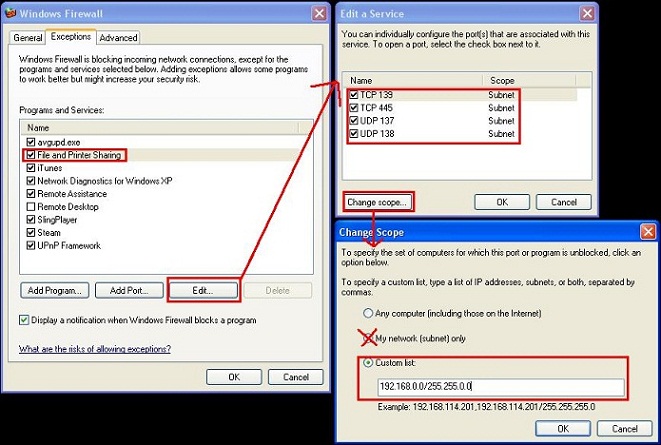
Looking at the Windows Firewall exceptions, I could see that File and Printer Sharing was already checked.  I clicked edit and saw the required ports defined here.  When I clicked “Change Scope”, I saw that it was set to “My network (subnet) only”.  For all four entries, I changed the scope to use a custom list that encompassed all 192.168.x.x networks and was able to browse the C$ share from all subnets.

Related Posts

Comments

Comment by Vlade Divac

March 14, 2011 8:10 AM

THANKS MAN ! ! ! I had this problem until i've red this article and configure firewall like in this text. I have two subnets, router is routing packets, everything seemed to be fine. But file&printer sharing didn't work in different scopes. You helped me a lot, regards to writer and CoNetRix form Serbia.

Comment by Carl

July 26, 2011 9:57 AM

Same as Vlade - worked a treat, thanks.

Comment by Laif

November 26, 2011 10:32 PM

Thanks from me, as well. This is a little nugget of information I needed in order to be able to access my windows shares from the subnet my Android phone is on. Cheers!

Add Comment


[b][/b] - [i][/i] - [u][/u]- [quote][/quote]