
On June 13, 2023, Fortinet announced a critical vulnerability in their SSL-VPN. In this article, we're going to give you a quick summary of what you need to know, including what Fortinet's SSL-VPN is, what you need to know about the vulnerability, how to know if you're affected, and what steps you may need to take.
About Fortinet SSL-VPN
Fortinet is a company that specializes in the convergence of networking and security. Their product line includes FortiOS – the operating system that runs on many of their hardware devices. A feature of FortiOS is the ability to enable a Secure Sockets Layer (SSL) Virtual Private Network (VPN) to allow users to establish a secure, encrypted connection between the public internet and an organization's network.
About the Vulnerability
According to the Fortinet statement, this vulnerability is a heap-based buffer overflow vulnerability in the SSL-VPN that could allow a remote attacker to execute their own code or commands. The vulnerability is especially dangerous because it can be exploited before any user authentication occurs, including multifactor authentication (MFA). This means the attacker does not need to steal credentials or other information about the organization before attempting the attack. Fortinet states that the vulnerability "may have been exploited in a limited number of cases." Fortinet's products are widely used and have been targeted frequently in the past.
This vulnerability affects many versions of FortiOS and FortiProxy. See the "Affected Products" section of Fortinet's advisory for details.
The vulnerability has been assigned CVE-2023-27997. Refer to the NIST National Vulnerability Database (NVD) for more information.
Fortinet has assigned this vulnerability the designation FG-IR-23-097. Refer to Fortinet's Product Security Incident Response Team (PSIRT) for more information.
Are You Affected?
Your organization may be affected by this vulnerability if you:
- Have SSL-VPN enabled on any Fortinet device. Check your IT asset inventory to identify Fortinet devices (e.g., Fortigate firewalls). For each device, determine if the SSL-VPN feature is enabled.
- Use a third party who uses Fortinet's SSL-VPN. Check with your critical third-party service providers to determine if they use Fortinet's SSL-VPN. For example, a vendor may enable it on a Fortigate firewall they manage in order to remotely connect to your network. Also, a critical vendor may use the SSL-VPN to provide remote access to their own employees. A breach of their network could result in a compromise of your sensitive information they store/process/transmit or a breach of your network if the vendor has that access.
Mitigation Steps
If your organization has Fortinet's SSL-VPN enabled, install the patch applicable to the version of FortiOS running on your device. These patches are identified in the "Solutions" section of Fortinet's PSIRT advisory. If you cannot install the patch immediately, consider disabling the SSL-VPN feature until the patch is installed. Likewise, if your organization has the SSL-VPN enabled, but does not use it, then disable it.
If your third parties have Fortinet's SSL-VPN enabled, request a statement from them about if the vulnerability has been patched. Add the statement to your incident tracking system and vendor management program.
We encourage you to continue to monitor information provided by Fortinet as information about this vulnerability is still developing.
Need Help?
The CoNetrix Technology and CoNetrix Security teams are available to answer your questions and help with the mitigation process. Contact our team through our website at CoNetrix.com/ContactUs. If you are a current customer, you can email the CoNetrix support inbox.

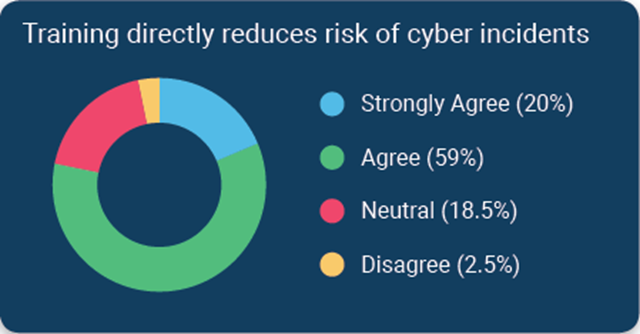 According to a survey of financial institutions conducted by Tandem, a CoNetrix Security partner, 79% of respondents stated they believe cybersecurity awareness training directly reduces the risk of security incidents. Download the 2020 State of Cybersecurity Report for additional trends and insights.